Introduction
The Workflow Manager (WM) is a python module that for managing a data processing project, which consists of scripts, processes and workspaces. A script describes a how to process data. A process is the actual execution of a script on data. Workspaces are when data is stored.
One key feature of WM is the ability to create pipelines for processing data. A pipeline is a sequence of processes acting of data, usually creating more data. The way WM achieves a pipeline is through script dependencies (see Figure 1). Scripts can depend on parent scripts. In the case where there is a dependency, on completion of a parent process the scripts that depend on the parent process will be executed creating more processes. If any of these new processes have dependencies, those would subsequently be executed.
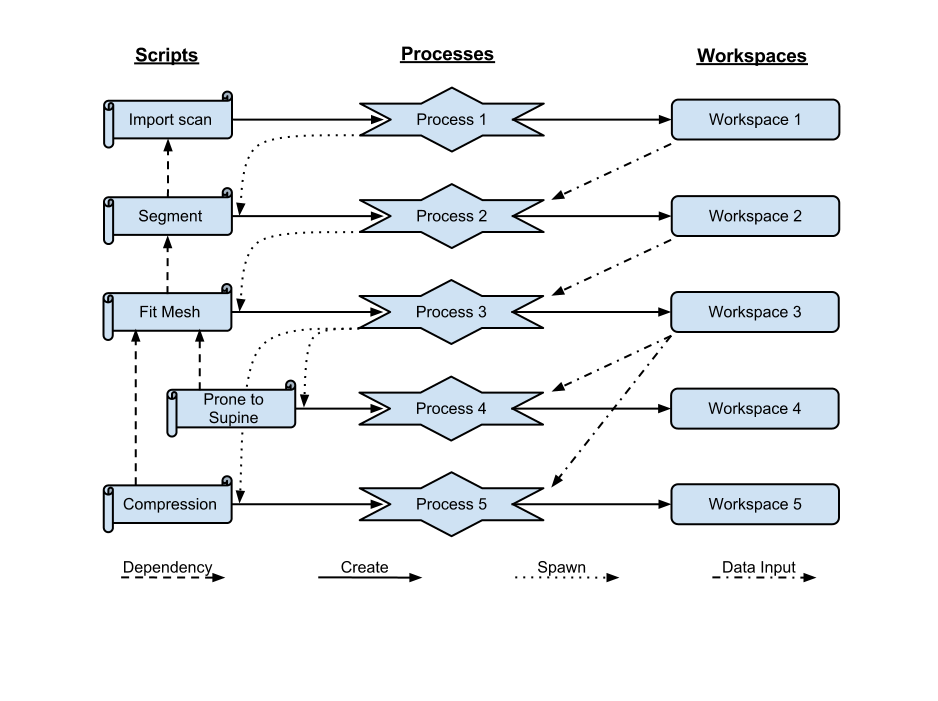
Fig. 1 Figure 1. An example of the cascading actions of a WM pipeline.
Figure 1 shows an example of a WM pipeline. The pipeline hinges on the scripts and their dependencies. In the example above, when the Import scan script is run it creates and spawns Process 1 which creates Workspace 1 which stores scan data. On completion of Process 1, Process 2 is spawned via the Import scan and Segment scripts since the Segment script depends on the Import scan script. Scan data from Workspace 1 is used by Process 2 to create data in Workspace 2. The sequence of action repeat until all the dependent scripts are executed.
Note that if the Import Scan script is rerun, then a new set of processes
and workspaces are created. However, a process or workspace in an existing
pipeline can be rerun and, if allowed, will rerun subsequent processes.